Removed text is struck through; added text is highlighted.
EVO5 is an out-of-production standalone logger that remains relevant when identifying and servicing installed motorsport systems. For the range overview see AiM in-car dataloggers.
ItemSpecificationStatusOut of productionECUCAN, RS232 or K-Line; second CANInputsEight configurable analogue inputs at up to 500 Hz each; four speed and coil RPMMotion / GPSThree-axis accelerometer and gyro; GPS09c supplied in listed kitsStorage / enclosure4 GB internal; SD up to 128 GB; IP65
Specifications and kit contents: AiM AiM EVO5 technical documentation. Check hardware generation and exact kit.
Pinout
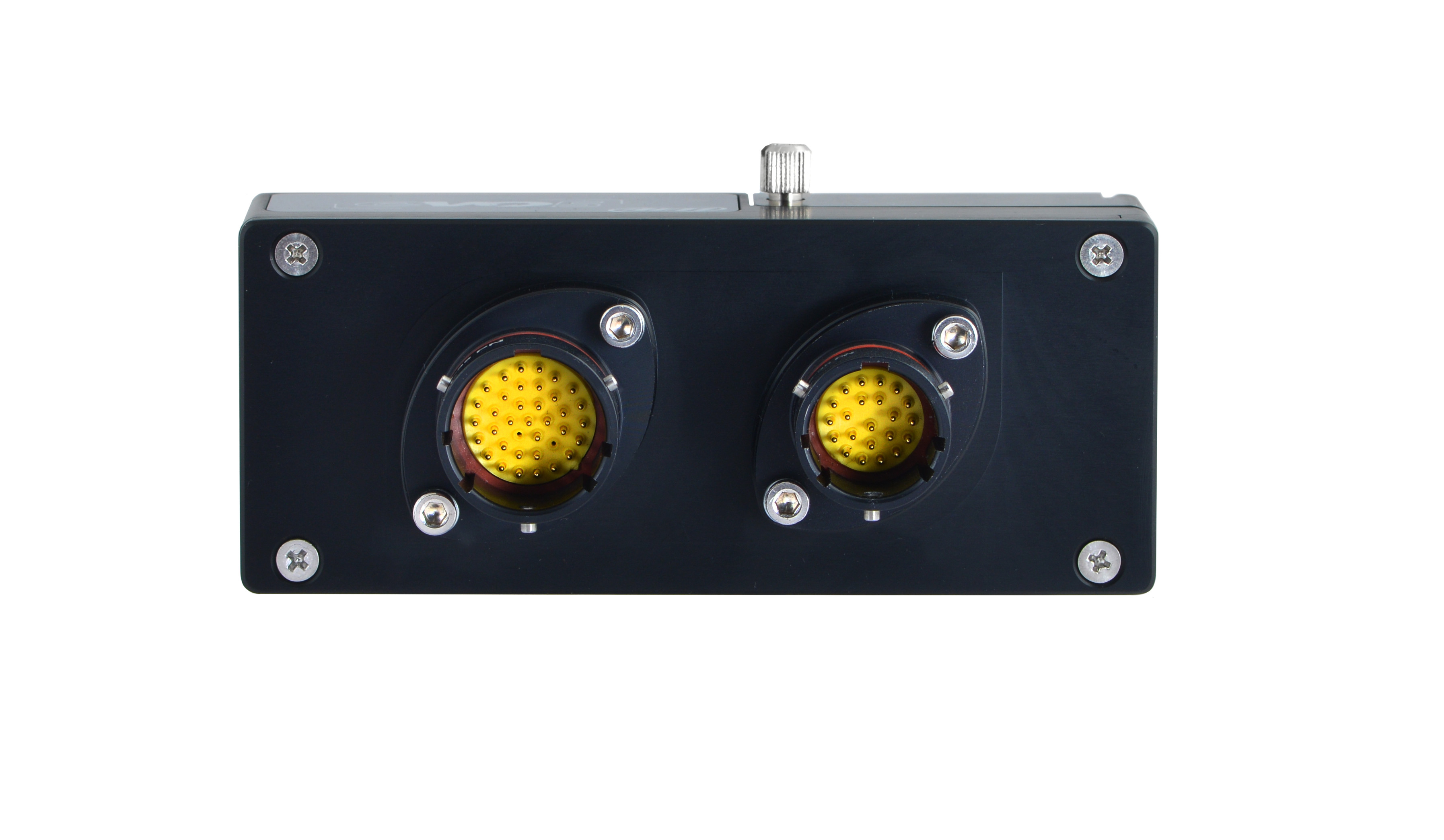
AiM's EVO5 sheet shows 37-pin and 22-pin Deutsch male connectors in external device view. RS232 on this EVO5 sheet is pin 21 TX and pin 22 RX; do not substitute the MXG 1.3 assignments.
EVO5 example ECU and power wiring; original Tuning Wiki illustration based on AiM documentation. Schematic diagrams do not show physical connector positions unless explicitly labelled.
AiM lists 37-pin harness V02586020 and 22-pin harness V02586030; kit and accessory contents vary. Configure the ECU protocol in Race Studio 3 before connecting CAN, serial or K-Line, as AiM's installation instructions specify.
Choose the correct model-specific lead and configure the ECU protocol in Race Studio 3. A connector shape alone does not establish vehicle compatibility. Confirm every cavity number, signal level, ground, power source and electrical limit in the linked AiM documentation before wiring; diagrams are from the device view or a conceptual schematic as stated. Secure the loom and make connections with power disconnected.
Software and further reading
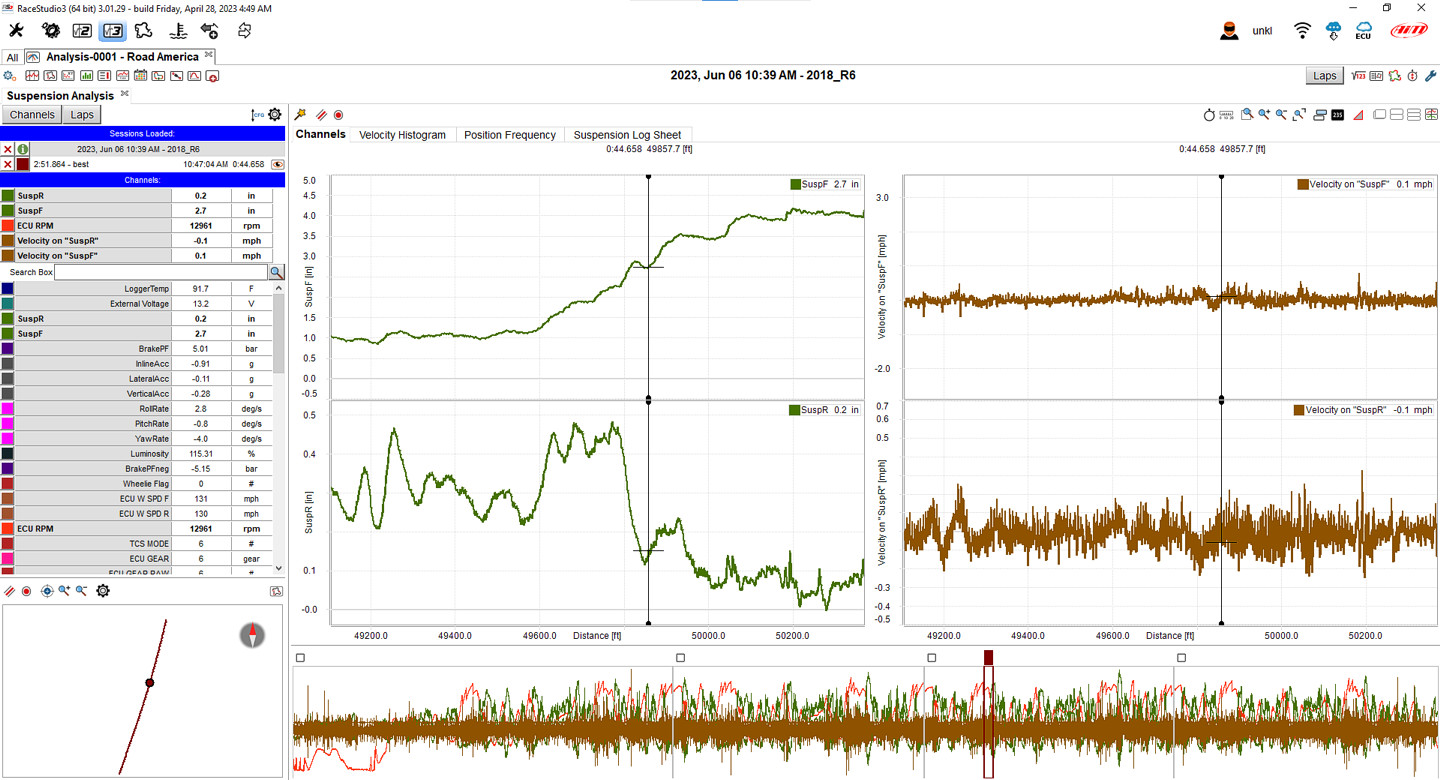
Race Studio 3 Analysis example showing suspension traces; actual channels depend on the device and connected sensors. Image: AiM, reproduced with permission; manufacturer source.Analysis and download: AiM documents downloading EVO5 recordings by USB, Wi-Fi or by inserting its SD card into the PC. Select a recorded session in Race Studio 3 to review and compare the available channels. AiM model guidance. Download the Windows software from AiM Race Studio 3 software downloads. For capabilities and compatibility see AiM data-log analysis software.
Use AiM Race Studio 3 to configure supported devices and analyse recorded sessions. Check the specific ECU protocol and cable before connection; not every source exposes every channel. Manufacturer references: model documentation; product and installation guidance.
Rendered revisions
Open each version to inspect formatting, tables and photographs.
Revision 1: AiM EVO5
EVO5 is an out-of-production standalone logger that remains relevant when identifying and servicing installed motorsport systems. For the range overview see AiM in-car dataloggers.
AiM's EVO5 sheet shows 37-pin and 22-pin Deutsch male connectors in external device view. RS232 on this EVO5 sheet is pin 21 TX and pin 22 RX; do not substitute the MXG 1.3 assignments.
Main 37-pin
Pin
Function
1
9–15 V power input
2
Battery ground
3
CAN+ expansion
4
Ground
5
+Vbattery CAN
6
CAN− expansion
7
+Vb external
8
CAN1+ ECU
9
CAN1− ECU
10
Ground
11
K-Line ECU
12
USB D+
13
USB D−
14
Ground
15
RPM
16
Ground
17
+Vbattery
18
Optical lap
19
Speed 1
20
Ground
21
+Vbattery
22
Analogue input 1
23
Analogue ground
24
+Vbattery
25
+Vreference
26
Analogue input 2
27
Analogue ground
28
+Vbattery
29
+Vreference
30
Analogue input 3
31
Analogue ground
32
+Vbattery
33
+Vreference
34
Analogue input 4
35
Analogue ground
36
+Vbattery
37
+Vreference
Additional 22-pin
Pin
Function
1
Analogue input 5
2
Analogue ground
3
+Vbattery
4
+Vreference
5
Analogue input 6
6
Analogue input 7
7
Analogue ground
8
+Vbattery
9
+Vreference
10
Analogue input 8
11
Speed 2
12
Ground
13
+Vbattery
14
Speed 3
15
Speed 4
16
Ground
17
CAN2+ ECU
18
CAN2− ECU
19
Digital output 1
20
Digital output 2
21
RS232 TX
22
RS232 RX
Wiring and installation
EVO5 example ECU and power wiring; original Tuning Wiki illustration based on AiM documentation. Schematic diagrams do not show physical connector positions unless explicitly labelled.
AiM lists 37-pin harness V02586020 and 22-pin harness V02586030; kit and accessory contents vary. Configure the ECU protocol in Race Studio 3 before connecting CAN, serial or K-Line, as AiM's installation instructions specify.
Choose the correct model-specific lead and configure the ECU protocol in Race Studio 3. A connector shape alone does not establish vehicle compatibility. Confirm every cavity number, signal level, ground, power source and electrical limit in the linked AiM documentation before wiring; diagrams are from the device view or a conceptual schematic as stated. Secure the loom and make connections with power disconnected.
Software and further reading
Use AiM Race Studio 3 to configure supported devices and analyse recorded sessions. Check the specific ECU protocol and cable before connection; not every source exposes every channel. Manufacturer references: model documentation; product and installation guidance.
Revision 2: AiM EVO5
EVO5 is an out-of-production standalone logger that remains relevant when identifying and servicing installed motorsport systems. For the range overview see AiM in-car dataloggers.
AiM's EVO5 sheet shows 37-pin and 22-pin Deutsch male connectors in external device view. RS232 on this EVO5 sheet is pin 21 TX and pin 22 RX; do not substitute the MXG 1.3 assignments.
Main 37-pin
Pin
Function
1
9–15 V power input
2
Battery ground
3
CAN+ expansion
4
Ground
5
+Vbattery CAN
6
CAN− expansion
7
+Vb external
8
CAN1+ ECU
9
CAN1− ECU
10
Ground
11
K-Line ECU
12
USB D+
13
USB D−
14
Ground
15
RPM
16
Ground
17
+Vbattery
18
Optical lap
19
Speed 1
20
Ground
21
+Vbattery
22
Analogue input 1
23
Analogue ground
24
+Vbattery
25
+Vreference
26
Analogue input 2
27
Analogue ground
28
+Vbattery
29
+Vreference
30
Analogue input 3
31
Analogue ground
32
+Vbattery
33
+Vreference
34
Analogue input 4
35
Analogue ground
36
+Vbattery
37
+Vreference
Additional 22-pin
Pin
Function
1
Analogue input 5
2
Analogue ground
3
+Vbattery
4
+Vreference
5
Analogue input 6
6
Analogue input 7
7
Analogue ground
8
+Vbattery
9
+Vreference
10
Analogue input 8
11
Speed 2
12
Ground
13
+Vbattery
14
Speed 3
15
Speed 4
16
Ground
17
CAN2+ ECU
18
CAN2− ECU
19
Digital output 1
20
Digital output 2
21
RS232 TX
22
RS232 RX
Wiring and installation
EVO5 example ECU and power wiring; original Tuning Wiki illustration based on AiM documentation. Schematic diagrams do not show physical connector positions unless explicitly labelled.
AiM lists 37-pin harness V02586020 and 22-pin harness V02586030; kit and accessory contents vary. Configure the ECU protocol in Race Studio 3 before connecting CAN, serial or K-Line, as AiM's installation instructions specify.
Choose the correct model-specific lead and configure the ECU protocol in Race Studio 3. A connector shape alone does not establish vehicle compatibility. Confirm every cavity number, signal level, ground, power source and electrical limit in the linked AiM documentation before wiring; diagrams are from the device view or a conceptual schematic as stated. Secure the loom and make connections with power disconnected.
Software and further reading
Race Studio 3 Analysis example showing suspension traces; actual channels depend on the device and connected sensors. Image: AiM, reproduced with permission; manufacturer source.
Analysis and download: AiM documents downloading EVO5 recordings by USB, Wi-Fi or by inserting its SD card into the PC. Select a recorded session in Race Studio 3 to review and compare the available channels. AiM model guidance. Download the Windows software from AiM Race Studio 3 software downloads. For capabilities and compatibility see AiM data-log analysis software.
Use AiM Race Studio 3 to configure supported devices and analyse recorded sessions. Check the specific ECU protocol and cable before connection; not every source exposes every channel. Manufacturer references: model documentation; product and installation guidance.