Removed text is struck through; added text is highlighted.
Dyna Pro Dynamometers is a UK manufacturer of dynamometer systems, particularly associated with motorcycles, karts and other powersports test applications.
Dyna Pro S125-LC load-controlled motorcycle dyno. Image: Dyna Pro; used by permission.
History
Dyna Pro's company biography traces development by Suzy Dent from early engine-test equipment to commercial dynamometer design in 2003. It says the Dyna Pro name was established under JD Engineering in 2004, eddy-brake machines followed in 2006, the operation moved to Basingstoke in 2008, and Dyna Pro Dynamometers Limited was formed in 2009. The company describes subsequent car-dyno development as well.
Selected dynos
S68 and S125: inertia-only motorcycle chassis models listed alongside their load-controlled counterparts.S68-LC, S125-LC and S125-LCE: listed eddy-brake motorcycle models. S125-LC product information describes a load-controlled system; ratings and features vary by option and generation.T62, T62-LC and T62-LCC: motorcycle, kart and ATV family entries listed in the manufacturer's technical index; LC denotes a listed eddy-brake configuration.
The tyre drives a roller. Inertia-only equipment infers output from acceleration; a fitted and controlled eddy brake adds a load-holding capability within its envelope. Compare individual data sheets rather than assuming all S or T systems have identical brakes or instrumentation.
Controllers and software
Dyna Run and Dyna View are the company's test and graphing software; its site references Dyna Run V3 and V4. The V3 user manual illustrates real-time displays, auxiliary channels and eddy-brake controls and notes features depend on model. Confirm the installed control hardware, licence and current software support before purchasing or rebuilding a used machine.
Part of Dynamometers and the manufacturers and suppliers directory. The products below are selected examples, not a complete catalogue; specifications, software and availability vary with generation and configuration.
How the Dyna Pro control system works
On a load-controlled Dyna Pro installation the vehicle turns the roller while speed and torque measurements feed the test system. The operator selects a test or target in Dyna Run, and suitable electronic hardware controls the eddy brake to vary the resisting load. In an inertia-only installation the roller's acceleration is used for the run; it has no eddy-brake load holding unless the appropriate mechanical brake and control hardware are added. See the S125-LC product specification and the Dyna Pro upgrades page.
General speed-hold feedback loop. This explains the principle rather than the internal wiring of a particular Dyna Pro model. Original schematic for Tuning Wiki, CC BY 4.0.
Models, inputs and control options
The S125-LC listing specifies an eddy brake with torque monitoring, closed-loop control and infrared temperature compensation, digital speed sensing, a USB link, hand controller, ignition pickup, calibration arm and check weight. It describes dynamic load control as self-learning with no user PID adjustment on that model. It lists twelve auxiliary 0–5 V acquisition inputs; confirm the fitted version and compatible sensor electronics before connecting equipment. The listed air brake is separate from the eddy-current load absorber.
Optional accessories on the same model page include cooling fans, single/dual/quad air–fuel equipment, a climate monitor, a four-channel K-type thermocouple unit and a road-speed-related RAM-air system. Some are included in a named show package and optional in other configurations. The accessories list also describes the remote pendant's fan operation and the climate module's temperature, pressure, humidity and relative-air-density display.
The manufacturer's technical index distinguishes S68, S125 and T62 inertia-only models from their LC/LCE/LCC eddy-braked variants. Model and generation determine the available sensors, brake and control features. The S125-LC specification identifies sweep, step, static and constant-load tests and continued inertia acceleration tests within the equipment's limits; it does not establish that every older Dyna Pro system has the same functions.
Dyna Run and Dyna View software
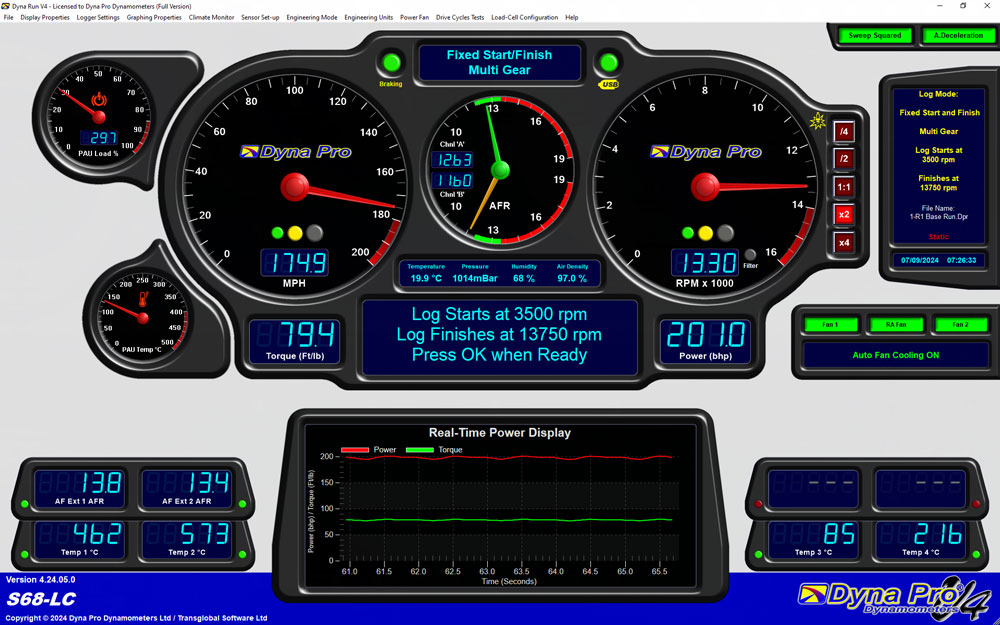
The software page identifies Dyna Run V4 for Windows 10/11 and Dyna View for viewing graphs. It illustrates live displays, wind-drag setup, linear or user-defined static tests and RAM-air setup. Actual availability depends on the dyno, brake, sensors and supplied options. A suitable controlled brake is required for static load holding; software alone cannot add one.
Manufacturer illustration of the Dyna Run V4 run screen; shown channels and functions depend on configuration. Image: Dyna Pro, used with permission.
Published pages mention both V3 and V4: the V3 manual documents an earlier interface and warns that functions vary by model, while the current product page identifies V4. Dyna Pro's published terms describe a time-limited V4 full-version entitlement for factory-new purchases and a standard free version thereafter. Confirm the installed software, current licence, update entitlement and compatible PC with the company; older published specifications may describe different terms.
Retrofitting an eddy brake
Dyna Pro lists the DP-EBU eddy-brake upgrade for its S68, S125 and T62 inertia-only dynos. The manufacturer says the physical brake upgrade adds closed-loop load-controlled testing while retaining inertia tests. This is an upgrade to named Dyna Pro machines; the source does not establish it as a universal controller conversion for other makes. Ask the supplier for the exact installation, brake power hardware, sensor, calibration and commissioning scope before ordering. Dyna Pro upgrade details.
For a used or upgraded system, identify its roller and brake model, control unit, software and licence, speed/torque sensors, climate and auxiliary modules, cooling, power-supply and emergency-brake arrangement. Verify calibration and test function using the relevant Dyna Pro documentation. See dynamometer control systems and factory and aftermarket controller comparison.
Rendered revisions
Open each version to inspect formatting, tables and photographs.
Revision 2: Dyna Pro dynamometers
Dyna Pro Dynamometers is a UK manufacturer of dynamometer systems, particularly associated with motorcycles, karts and other powersports test applications.
Dyna Pro S125-LC load-controlled motorcycle dyno. Image: Dyna Pro; used by permission.
History
Dyna Pro's company biography traces development by Suzy Dent from early engine-test equipment to commercial dynamometer design in 2003. It says the Dyna Pro name was established under JD Engineering in 2004, eddy-brake machines followed in 2006, the operation moved to Basingstoke in 2008, and Dyna Pro Dynamometers Limited was formed in 2009. The company describes subsequent car-dyno development as well.
Selected dynos
S68 and S125: inertia-only motorcycle chassis models listed alongside their load-controlled counterparts.
S68-LC, S125-LC and S125-LCE: listed eddy-brake motorcycle models. S125-LC product information describes a load-controlled system; ratings and features vary by option and generation.
T62, T62-LC and T62-LCC: motorcycle, kart and ATV family entries listed in the manufacturer's technical index; LC denotes a listed eddy-brake configuration.
The tyre drives a roller. Inertia-only equipment infers output from acceleration; a fitted and controlled eddy brake adds a load-holding capability within its envelope. Compare individual data sheets rather than assuming all S or T systems have identical brakes or instrumentation.
Controllers and software
Dyna Run and Dyna View are the company's test and graphing software; its site references Dyna Run V3 and V4. The V3 user manual illustrates real-time displays, auxiliary channels and eddy-brake controls and notes features depend on model. Confirm the installed control hardware, licence and current software support before purchasing or rebuilding a used machine.
Part of Dynamometers and the manufacturers and suppliers directory. The products below are selected examples, not a complete catalogue; specifications, software and availability vary with generation and configuration.
How the Dyna Pro control system works
On a load-controlled Dyna Pro installation the vehicle turns the roller while speed and torque measurements feed the test system. The operator selects a test or target in Dyna Run, and suitable electronic hardware controls the eddy brake to vary the resisting load. In an inertia-only installation the roller's acceleration is used for the run; it has no eddy-brake load holding unless the appropriate mechanical brake and control hardware are added. See the S125-LC product specification and the Dyna Pro upgrades page.
General speed-hold feedback loop. This explains the principle rather than the internal wiring of a particular Dyna Pro model. Original schematic for Tuning Wiki, CC BY 4.0.
Models, inputs and control options
The S125-LC listing specifies an eddy brake with torque monitoring, closed-loop control and infrared temperature compensation, digital speed sensing, a USB link, hand controller, ignition pickup, calibration arm and check weight. It describes dynamic load control as self-learning with no user PID adjustment on that model. It lists twelve auxiliary 0–5 V acquisition inputs; confirm the fitted version and compatible sensor electronics before connecting equipment. The listed air brake is separate from the eddy-current load absorber.
Optional accessories on the same model page include cooling fans, single/dual/quad air–fuel equipment, a climate monitor, a four-channel K-type thermocouple unit and a road-speed-related RAM-air system. Some are included in a named show package and optional in other configurations. The accessories list also describes the remote pendant's fan operation and the climate module's temperature, pressure, humidity and relative-air-density display.
The manufacturer's technical index distinguishes S68, S125 and T62 inertia-only models from their LC/LCE/LCC eddy-braked variants. Model and generation determine the available sensors, brake and control features. The S125-LC specification identifies sweep, step, static and constant-load tests and continued inertia acceleration tests within the equipment's limits; it does not establish that every older Dyna Pro system has the same functions.
Dyna Run and Dyna View software
The software page identifies Dyna Run V4 for Windows 10/11 and Dyna View for viewing graphs. It illustrates live displays, wind-drag setup, linear or user-defined static tests and RAM-air setup. Actual availability depends on the dyno, brake, sensors and supplied options. A suitable controlled brake is required for static load holding; software alone cannot add one.
Manufacturer illustration of the Dyna Run V4 run screen; shown channels and functions depend on configuration. Image: Dyna Pro, used with permission.
Published pages mention both V3 and V4: the V3 manual documents an earlier interface and warns that functions vary by model, while the current product page identifies V4. Dyna Pro's published terms describe a time-limited V4 full-version entitlement for factory-new purchases and a standard free version thereafter. Confirm the installed software, current licence, update entitlement and compatible PC with the company; older published specifications may describe different terms.
Retrofitting an eddy brake
Dyna Pro lists the DP-EBU eddy-brake upgrade for its S68, S125 and T62 inertia-only dynos. The manufacturer says the physical brake upgrade adds closed-loop load-controlled testing while retaining inertia tests. This is an upgrade to named Dyna Pro machines; the source does not establish it as a universal controller conversion for other makes. Ask the supplier for the exact installation, brake power hardware, sensor, calibration and commissioning scope before ordering. Dyna Pro upgrade details.
For a used or upgraded system, identify its roller and brake model, control unit, software and licence, speed/torque sensors, climate and auxiliary modules, cooling, power-supply and emergency-brake arrangement. Verify calibration and test function using the relevant Dyna Pro documentation. See dynamometer control systems and factory and aftermarket controller comparison.
Revision 2: Dyna Pro dynamometers
Dyna Pro Dynamometers is a UK manufacturer of dynamometer systems, particularly associated with motorcycles, karts and other powersports test applications.
Dyna Pro S125-LC load-controlled motorcycle dyno. Image: Dyna Pro; used by permission.
History
Dyna Pro's company biography traces development by Suzy Dent from early engine-test equipment to commercial dynamometer design in 2003. It says the Dyna Pro name was established under JD Engineering in 2004, eddy-brake machines followed in 2006, the operation moved to Basingstoke in 2008, and Dyna Pro Dynamometers Limited was formed in 2009. The company describes subsequent car-dyno development as well.
Selected dynos
S68 and S125: inertia-only motorcycle chassis models listed alongside their load-controlled counterparts.
S68-LC, S125-LC and S125-LCE: listed eddy-brake motorcycle models. S125-LC product information describes a load-controlled system; ratings and features vary by option and generation.
T62, T62-LC and T62-LCC: motorcycle, kart and ATV family entries listed in the manufacturer's technical index; LC denotes a listed eddy-brake configuration.
The tyre drives a roller. Inertia-only equipment infers output from acceleration; a fitted and controlled eddy brake adds a load-holding capability within its envelope. Compare individual data sheets rather than assuming all S or T systems have identical brakes or instrumentation.
Controllers and software
Dyna Run and Dyna View are the company's test and graphing software; its site references Dyna Run V3 and V4. The V3 user manual illustrates real-time displays, auxiliary channels and eddy-brake controls and notes features depend on model. Confirm the installed control hardware, licence and current software support before purchasing or rebuilding a used machine.
Part of Dynamometers and the manufacturers and suppliers directory. The products below are selected examples, not a complete catalogue; specifications, software and availability vary with generation and configuration.
How the Dyna Pro control system works
On a load-controlled Dyna Pro installation the vehicle turns the roller while speed and torque measurements feed the test system. The operator selects a test or target in Dyna Run, and suitable electronic hardware controls the eddy brake to vary the resisting load. In an inertia-only installation the roller's acceleration is used for the run; it has no eddy-brake load holding unless the appropriate mechanical brake and control hardware are added. See the S125-LC product specification and the Dyna Pro upgrades page.
General speed-hold feedback loop. This explains the principle rather than the internal wiring of a particular Dyna Pro model. Original schematic for Tuning Wiki, CC BY 4.0.
Models, inputs and control options
The S125-LC listing specifies an eddy brake with torque monitoring, closed-loop control and infrared temperature compensation, digital speed sensing, a USB link, hand controller, ignition pickup, calibration arm and check weight. It describes dynamic load control as self-learning with no user PID adjustment on that model. It lists twelve auxiliary 0–5 V acquisition inputs; confirm the fitted version and compatible sensor electronics before connecting equipment. The listed air brake is separate from the eddy-current load absorber.
Optional accessories on the same model page include cooling fans, single/dual/quad air–fuel equipment, a climate monitor, a four-channel K-type thermocouple unit and a road-speed-related RAM-air system. Some are included in a named show package and optional in other configurations. The accessories list also describes the remote pendant's fan operation and the climate module's temperature, pressure, humidity and relative-air-density display.
The manufacturer's technical index distinguishes S68, S125 and T62 inertia-only models from their LC/LCE/LCC eddy-braked variants. Model and generation determine the available sensors, brake and control features. The S125-LC specification identifies sweep, step, static and constant-load tests and continued inertia acceleration tests within the equipment's limits; it does not establish that every older Dyna Pro system has the same functions.
Dyna Run and Dyna View software
The software page identifies Dyna Run V4 for Windows 10/11 and Dyna View for viewing graphs. It illustrates live displays, wind-drag setup, linear or user-defined static tests and RAM-air setup. Actual availability depends on the dyno, brake, sensors and supplied options. A suitable controlled brake is required for static load holding; software alone cannot add one.
Manufacturer illustration of the Dyna Run V4 run screen; shown channels and functions depend on configuration. Image: Dyna Pro, used with permission.
Published pages mention both V3 and V4: the V3 manual documents an earlier interface and warns that functions vary by model, while the current product page identifies V4. Dyna Pro's published terms describe a time-limited V4 full-version entitlement for factory-new purchases and a standard free version thereafter. Confirm the installed software, current licence, update entitlement and compatible PC with the company; older published specifications may describe different terms.
Retrofitting an eddy brake
Dyna Pro lists the DP-EBU eddy-brake upgrade for its S68, S125 and T62 inertia-only dynos. The manufacturer says the physical brake upgrade adds closed-loop load-controlled testing while retaining inertia tests. This is an upgrade to named Dyna Pro machines; the source does not establish it as a universal controller conversion for other makes. Ask the supplier for the exact installation, brake power hardware, sensor, calibration and commissioning scope before ordering. Dyna Pro upgrade details.
For a used or upgraded system, identify its roller and brake model, control unit, software and licence, speed/torque sensors, climate and auxiliary modules, cooling, power-supply and emergency-brake arrangement. Verify calibration and test function using the relevant Dyna Pro documentation. See dynamometer control systems and factory and aftermarket controller comparison.