Removed text is struck through; added text is highlighted.
EVO6 is a standalone motorsport logger with eight configurable analogue channels, inertial measurement, ECU communication and external GPS support. For the range overview see AiM in-car dataloggers.
AiM EVO6 and EVO6L loggers. Image: AiM, reproduced with permission; AiM product picture library.
Specifications
ItemSpecificationECUCAN, RS232 or K-Line; second CAN availableInputsEight configurable analogue inputs; four speed inputs and coil RPMInertial / GPSThree-axis accelerometer and gyro; GPS09c supplied in specified kitsStorage4 GB internal plus optional SD cardOutputs / bodyTwo digital outputs, up to 1 A each; IP65 aluminium housing
Specifications and kit contents: AiM AiM EVO6 technical documentation. Check hardware generation and exact kit.
Pinout
AiM's EVO6 technical sheet identifies 37-pin and 22-pin device connector assignments in external view. Its documentation and product descriptions use different connector-family wording; check the actual logger, mating connector and any adapter. Do not carry over MXG 1.3's RS232 labels.
EVO6 example ECU and power wiring; original Tuning Wiki illustration based on AiM documentation. Schematic diagrams do not show physical connector positions unless explicitly labelled.
The main harness carries power, ECU, expansion and sensor connections. The 22-pin harness provides additional analogue, speed, output and CAN/serial connections. AiM offers a 37-pin Deutsch harness and Amphenol adapter for the specified EVO6 kit; verify connector fit and ordering details with AiM.
Choose the correct model-specific lead and configure the ECU protocol in Race Studio 3. A connector shape alone does not establish vehicle compatibility. Confirm every cavity number, signal level, ground, power source and electrical limit in the linked AiM documentation before wiring; diagrams are from the device view or a conceptual schematic as stated. Secure the loom and make connections with power disconnected.
Software and further reading
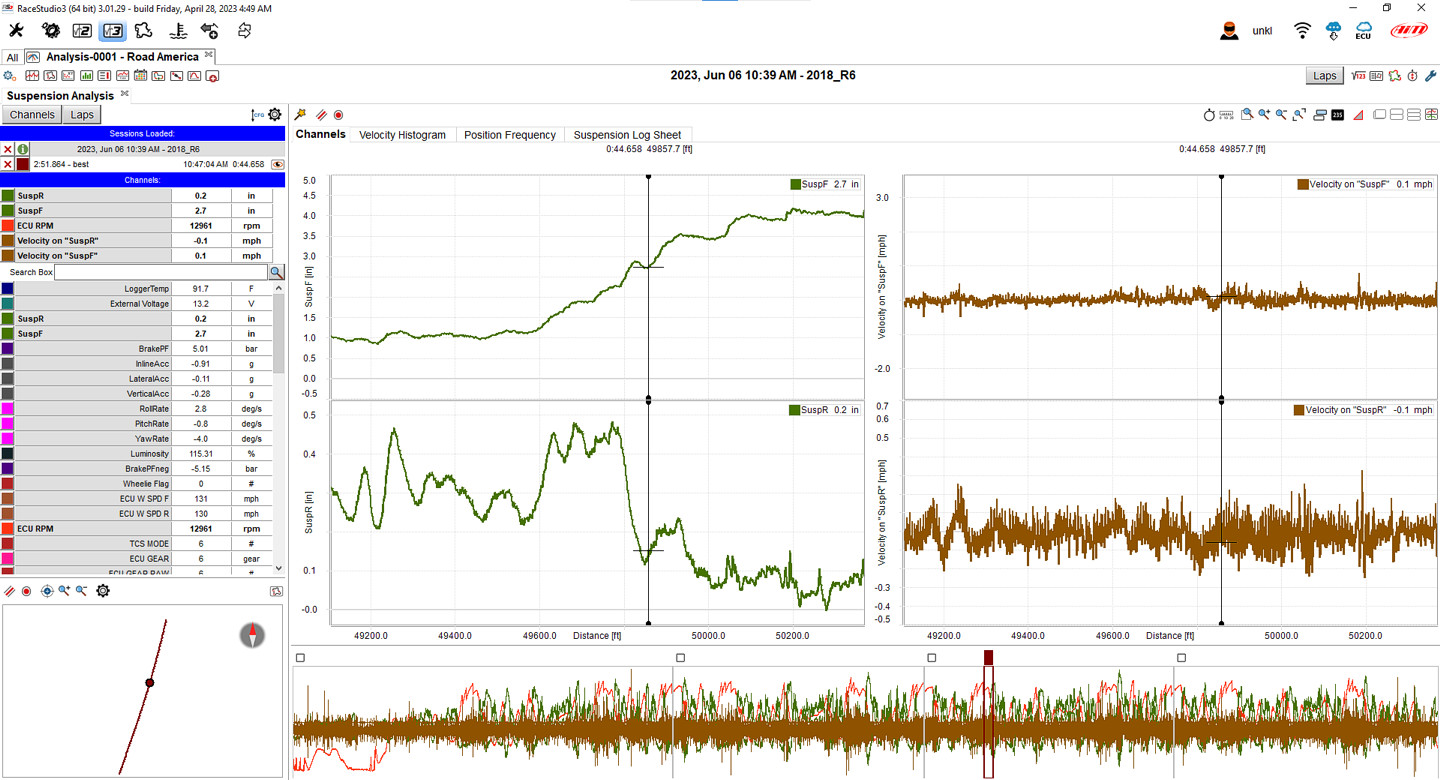
Race Studio 3 Analysis example showing suspension traces; actual channels depend on the device and connected sensors. Image: AiM, reproduced with permission; manufacturer source.Analysis and download: AiM supports PC analysis of EVO6 recordings in Race Studio Analysis; the EVO6 provides Wi-Fi and USB connections and can also record to an optional SD card. AiM model guidance. Download the Windows software from AiM Race Studio 3 software downloads. For capabilities and compatibility see AiM data-log analysis software.
Use AiM Race Studio 3 to configure supported devices and analyse recorded sessions. Check the specific ECU protocol and cable before connection; not every source exposes every channel. Manufacturer references: model documentation; product and installation guidance.
Rendered revisions
Open each version to inspect formatting, tables and photographs.
Revision 1: AiM EVO6
EVO6 is a standalone motorsport logger with eight configurable analogue channels, inertial measurement, ECU communication and external GPS support. For the range overview see AiM in-car dataloggers.
AiM's EVO6 technical sheet identifies 37-pin and 22-pin device connector assignments in external view. Its documentation and product descriptions use different connector-family wording; check the actual logger, mating connector and any adapter. Do not carry over MXG 1.3's RS232 labels.
Main 37-pin
Pin
Function
1
9–15 V power input
2
Battery ground
3
CAN+ expansion
4
Ground
5
+Vbattery CAN
6
CAN− expansion
7
+Vb external
8
CAN1+ ECU
9
CAN1− ECU
10
Ground
11
K-Line ECU
12
USB D+
13
USB D−
14
Ground
15
RPM
16
Ground
17
+Vbattery
18
Optical lap
19
Speed 1
20
Ground
21
+Vbattery
22
Analogue input 1
23
Analogue ground
24
+Vbattery
25
+Vreference
26
Analogue input 2
27
Analogue ground
28
+Vbattery
29
+Vreference
30
Analogue input 3
31
Analogue ground
32
+Vbattery
33
+Vreference
34
Analogue input 4
35
Analogue ground
36
+Vbattery
37
+Vreference
Additional 22-pin
Pin
Function
1
Analogue input 5
2
Analogue ground
3
+Vbattery
4
+Vreference
5
Analogue input 6
6
Analogue input 7
7
Analogue ground
8
+Vbattery
9
+Vreference
10
Analogue input 8
11
Speed 2
12
Ground
13
+Vbattery
14
Speed 3
15
Speed 4
16
Ground
17
CAN2+ ECU
18
CAN2− ECU
19
Digital output 1
20
Digital output 2
21
RS232 TX
22
RS232 RX
Wiring and installation
EVO6 example ECU and power wiring; original Tuning Wiki illustration based on AiM documentation. Schematic diagrams do not show physical connector positions unless explicitly labelled.
The main harness carries power, ECU, expansion and sensor connections. The 22-pin harness provides additional analogue, speed, output and CAN/serial connections. AiM offers a 37-pin Deutsch harness and Amphenol adapter for the specified EVO6 kit; verify connector fit and ordering details with AiM.
Choose the correct model-specific lead and configure the ECU protocol in Race Studio 3. A connector shape alone does not establish vehicle compatibility. Confirm every cavity number, signal level, ground, power source and electrical limit in the linked AiM documentation before wiring; diagrams are from the device view or a conceptual schematic as stated. Secure the loom and make connections with power disconnected.
Software and further reading
Use AiM Race Studio 3 to configure supported devices and analyse recorded sessions. Check the specific ECU protocol and cable before connection; not every source exposes every channel. Manufacturer references: model documentation; product and installation guidance.
Revision 2: AiM EVO6
EVO6 is a standalone motorsport logger with eight configurable analogue channels, inertial measurement, ECU communication and external GPS support. For the range overview see AiM in-car dataloggers.
AiM's EVO6 technical sheet identifies 37-pin and 22-pin device connector assignments in external view. Its documentation and product descriptions use different connector-family wording; check the actual logger, mating connector and any adapter. Do not carry over MXG 1.3's RS232 labels.
Main 37-pin
Pin
Function
1
9–15 V power input
2
Battery ground
3
CAN+ expansion
4
Ground
5
+Vbattery CAN
6
CAN− expansion
7
+Vb external
8
CAN1+ ECU
9
CAN1− ECU
10
Ground
11
K-Line ECU
12
USB D+
13
USB D−
14
Ground
15
RPM
16
Ground
17
+Vbattery
18
Optical lap
19
Speed 1
20
Ground
21
+Vbattery
22
Analogue input 1
23
Analogue ground
24
+Vbattery
25
+Vreference
26
Analogue input 2
27
Analogue ground
28
+Vbattery
29
+Vreference
30
Analogue input 3
31
Analogue ground
32
+Vbattery
33
+Vreference
34
Analogue input 4
35
Analogue ground
36
+Vbattery
37
+Vreference
Additional 22-pin
Pin
Function
1
Analogue input 5
2
Analogue ground
3
+Vbattery
4
+Vreference
5
Analogue input 6
6
Analogue input 7
7
Analogue ground
8
+Vbattery
9
+Vreference
10
Analogue input 8
11
Speed 2
12
Ground
13
+Vbattery
14
Speed 3
15
Speed 4
16
Ground
17
CAN2+ ECU
18
CAN2− ECU
19
Digital output 1
20
Digital output 2
21
RS232 TX
22
RS232 RX
Wiring and installation
EVO6 example ECU and power wiring; original Tuning Wiki illustration based on AiM documentation. Schematic diagrams do not show physical connector positions unless explicitly labelled.
The main harness carries power, ECU, expansion and sensor connections. The 22-pin harness provides additional analogue, speed, output and CAN/serial connections. AiM offers a 37-pin Deutsch harness and Amphenol adapter for the specified EVO6 kit; verify connector fit and ordering details with AiM.
Choose the correct model-specific lead and configure the ECU protocol in Race Studio 3. A connector shape alone does not establish vehicle compatibility. Confirm every cavity number, signal level, ground, power source and electrical limit in the linked AiM documentation before wiring; diagrams are from the device view or a conceptual schematic as stated. Secure the loom and make connections with power disconnected.
Software and further reading
Race Studio 3 Analysis example showing suspension traces; actual channels depend on the device and connected sensors. Image: AiM, reproduced with permission; manufacturer source.
Analysis and download: AiM supports PC analysis of EVO6 recordings in Race Studio Analysis; the EVO6 provides Wi-Fi and USB connections and can also record to an optional SD card. AiM model guidance. Download the Windows software from AiM Race Studio 3 software downloads. For capabilities and compatibility see AiM data-log analysis software.
Use AiM Race Studio 3 to configure supported devices and analyse recorded sessions. Check the specific ECU protocol and cable before connection; not every source exposes every channel. Manufacturer references: model documentation; product and installation guidance.