Removed text is struck through; added text is highlighted.
The standard Solo 2 is a GPS lap timer and logger with an integrated display and battery. Unlike Solo 2 DL, it does not connect to the ECU for vehicle channels. For the range overview see AiM in-car dataloggers.
AiM Solo 2. Image: AiM, reproduced with permission; AiM product picture library.
Specifications
ItemSpecificationGNSS and motion25 Hz GNSS; internal three-axis accelerometer and gyroscopeDisplay238 × 99 graphical display; up to five configurable pagesMemory / power4 GB internal; rechargeable lithium battery; 9–15 V externalCommunicationsWi-Fi; no ECU connectionEnclosure98 × 73.7 × 30.2 mm; IP67
Specifications and kit contents: AiM Solo 2 technical documentation. Check hardware generation and exact kit.Specifications and kit contents: AiM AiM Solo 2 technical documentation. Check hardware generation and exact kit.
Pinout
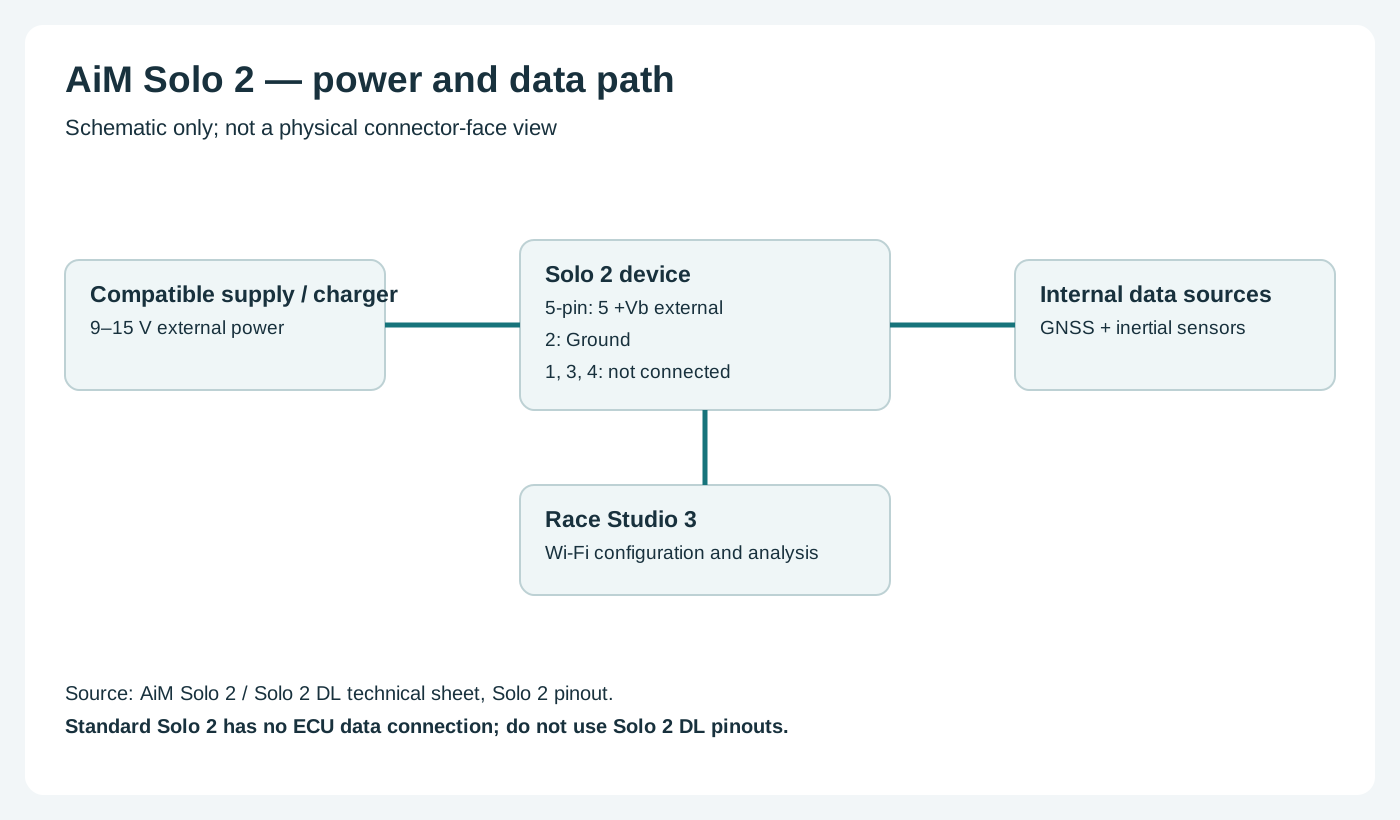
On standard Solo 2, AiM's five-pin Binder 712 female EXP connector external view has the assignments below. This is not the Solo 2 DL expansion pinout. See AiM technical sheet, page 4.
Solo 2 power and data paths; original Tuning Wiki illustration based on AiM documentation. Schematic diagrams do not show physical connector positions unless explicitly labelled.
AiM lists a car-lighter power cable and AC battery charger. A 5-pin plug is not evidence of an ECU connection. Do not apply the Solo 2 DL EXP CAN assignments to this unit.
Choose the correct Solo 2 power lead and configure the device in Race Studio 3. Confirm every cavity number, signal level, ground, power source and electrical limit in the linked AiM documentation before wiring; diagrams are from the device view or a conceptual schematic as stated. Secure the loom and make connections with power disconnected.Choose the correct model-specific lead and configure the ECU protocol in Race Studio 3. A connector shape alone does not establish vehicle compatibility. Confirm every cavity number, signal level, ground, power source and electrical limit in the linked AiM documentation before wiring; diagrams are from the device view or a conceptual schematic as stated. Secure the loom and make connections with power disconnected.
Software and further reading
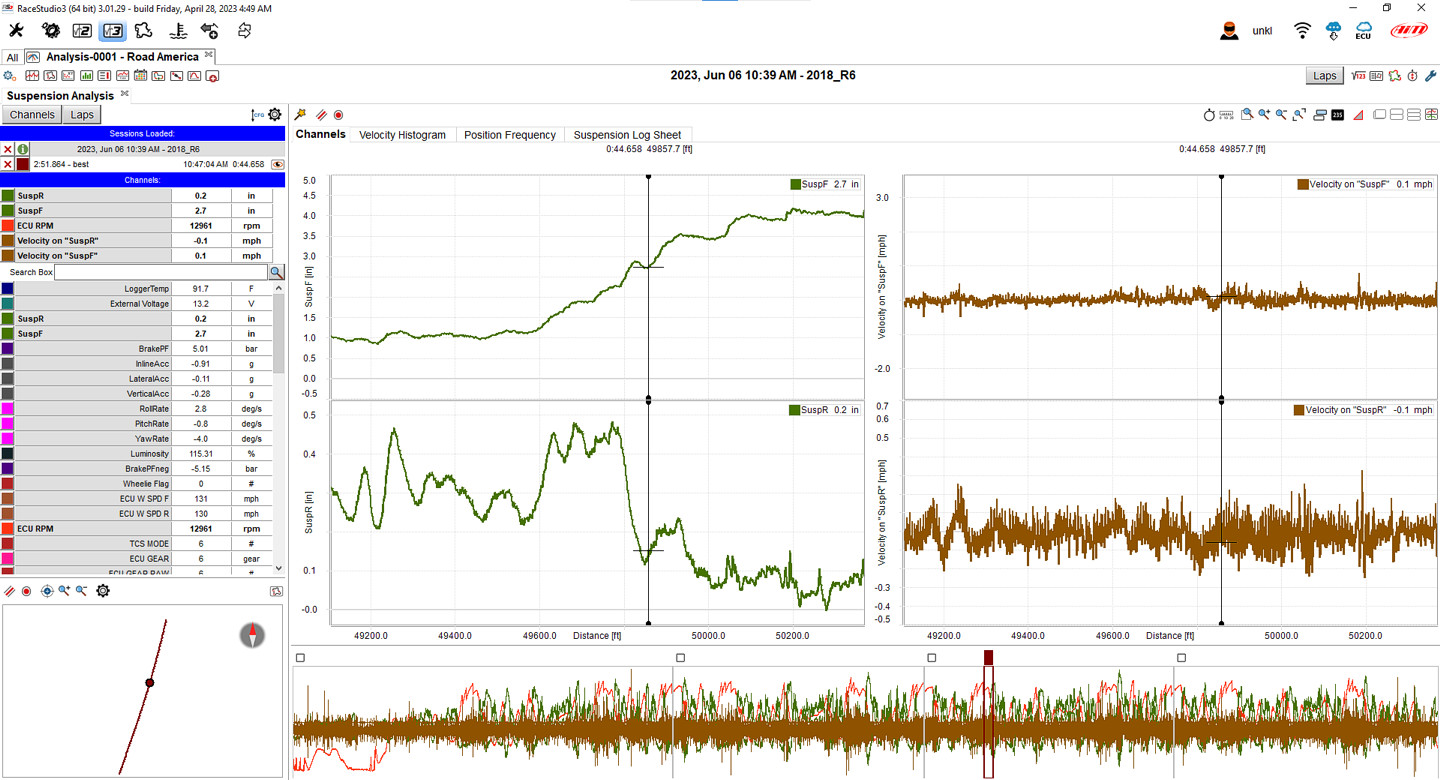
Race Studio 3 Analysis example showing suspension traces; actual channels depend on the device and connected sensors. Image: AiM, reproduced with permission; manufacturer source.Analysis and download: AiM supports reviewing Solo 2 recordings in Race Studio 3. The standard Solo 2 records GPS and inertial data, not the ECU channels available with the Solo 2 DL. AiM model guidance. Download the Windows software from AiM Race Studio 3 software downloads. For capabilities and compatibility see AiM data-log analysis software.Use AiM Race Studio 3 to configure supported devices and analyse recorded sessions. The standard Solo 2 does not record ECU channels; select the DL variant if an appropriate ECU connection is needed. Manufacturer references: model documentation; product and installation guidance.Use AiM Race Studio 3 to configure supported devices and analyse recorded sessions. Check the specific ECU protocol and cable before connection; not every source exposes every channel. Manufacturer references: model documentation; product and installation guidance.
Rendered revisions
Open each version to inspect formatting, tables and photographs.
Revision 1: AiM Solo 2
The standard Solo 2 is a GPS lap timer and logger with an integrated display and battery. Unlike Solo 2 DL, it does not connect to the ECU for vehicle channels. For the range overview see AiM in-car dataloggers.
On standard Solo 2, AiM's five-pin Binder 712 female EXP connector external view has the assignments below. This is not the Solo 2 DL expansion pinout. See AiM technical sheet, page 4.
Item
Specification
1
Not connected
2
Ground
3
Not connected
4
Not connected
5
+Vb external
Wiring and installation
Solo 2 power and data paths; original Tuning Wiki illustration based on AiM documentation. Schematic diagrams do not show physical connector positions unless explicitly labelled.
AiM lists a car-lighter power cable and AC battery charger. A 5-pin plug is not evidence of an ECU connection. Do not apply the Solo 2 DL EXP CAN assignments to this unit.
Choose the correct model-specific lead and configure the ECU protocol in Race Studio 3. A connector shape alone does not establish vehicle compatibility. Confirm every cavity number, signal level, ground, power source and electrical limit in the linked AiM documentation before wiring; diagrams are from the device view or a conceptual schematic as stated. Secure the loom and make connections with power disconnected.
Software and further reading
Use AiM Race Studio 3 to configure supported devices and analyse recorded sessions. Check the specific ECU protocol and cable before connection; not every source exposes every channel. Manufacturer references: model documentation; product and installation guidance.
Revision 3: AiM Solo 2
The standard Solo 2 is a GPS lap timer and logger with an integrated display and battery. Unlike Solo 2 DL, it does not connect to the ECU for vehicle channels. For the range overview see AiM in-car dataloggers.
On standard Solo 2, AiM's five-pin Binder 712 female EXP connector external view has the assignments below. This is not the Solo 2 DL expansion pinout. See AiM technical sheet, page 4.
Item
Specification
1
Not connected
2
Ground
3
Not connected
4
Not connected
5
+Vb external
Wiring and installation
Solo 2 power and data paths; original Tuning Wiki illustration based on AiM documentation. Schematic diagrams do not show physical connector positions unless explicitly labelled.
AiM lists a car-lighter power cable and AC battery charger. A 5-pin plug is not evidence of an ECU connection. Do not apply the Solo 2 DL EXP CAN assignments to this unit.
Choose the correct Solo 2 power lead and configure the device in Race Studio 3. Confirm every cavity number, signal level, ground, power source and electrical limit in the linked AiM documentation before wiring; diagrams are from the device view or a conceptual schematic as stated. Secure the loom and make connections with power disconnected.
Software and further reading
Race Studio 3 Analysis example showing suspension traces; actual channels depend on the device and connected sensors. Image: AiM, reproduced with permission; manufacturer source.
Analysis and download: AiM supports reviewing Solo 2 recordings in Race Studio 3. The standard Solo 2 records GPS and inertial data, not the ECU channels available with the Solo 2 DL. AiM model guidance. Download the Windows software from AiM Race Studio 3 software downloads. For capabilities and compatibility see AiM data-log analysis software.
Use AiM Race Studio 3 to configure supported devices and analyse recorded sessions. The standard Solo 2 does not record ECU channels; select the DL variant if an appropriate ECU connection is needed. Manufacturer references: model documentation; product and installation guidance.