Removed text is struck through; added text is highlighted.
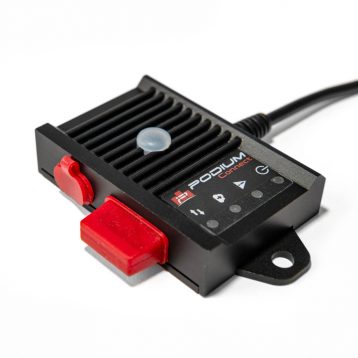
PodiumConnect/Micro connects a compatible CAN data system to local logging and the Podium service through a separately supplied Wi-Fi hotspot.
PodiumConnect/Micro. Image: Autosport Labs; reproduced with permission. Manufacturer product page.
Specifications and operation
PodiumConnect/Micro is designed to connect an existing data system to Podium. The manufacturer documents one CAN 2.0 bus, software-controlled termination, local recording, and streaming through a supplied-by-user Wi-Fi hotspot; it is not the same as an integrated cellular modem. Its guide provides data-system integration instructions including AiM, MoTeC and VBOX. Check the precise source device, available broadcast channels, cable, GPS data and configuration. Its stated maximum telemetry sample rate is 10 Hz, while local logging can use different rates.
The manufacturer lists one CAN 2.0 interface, software-controlled termination, local SD logging and hotspot-based telemetry up to 10 Hz; a separate source supplies channels such as GPS. The local recording rate and transmitted update rate differ. Micro technical guide.
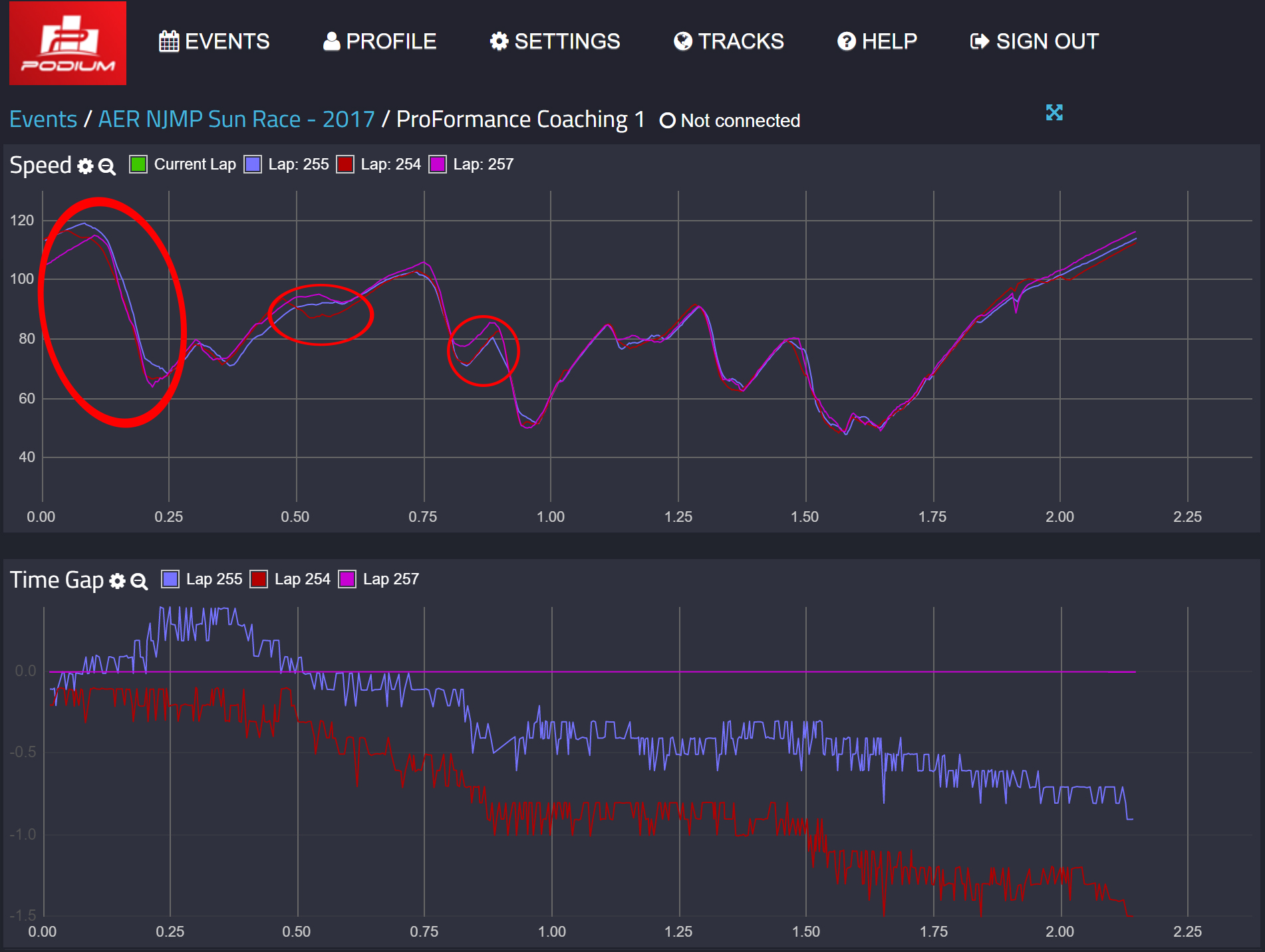
Data analysis softwarePodium lap comparison showing speed traces and time gaps in an earlier interface. Image: Autosport Labs, reproduced with permission; manufacturer image source.The RaceCapture app configures Micro and can analyse locally recorded data; its manufacturer also describes reviewing uploaded sessions on Podium. The Micro receives channels from an external data system and needs a separate hotspot for live internet telemetry. See the manufacturer model guide and RaceCapture app guide for setup and analysis. Download the RaceCapture app from Autosport Labs; Podium is the separate online telemetry and session-analysis service. For system requirements and software details see the Autosport Labs manufacturer page.
Pigtail pinout and wiring
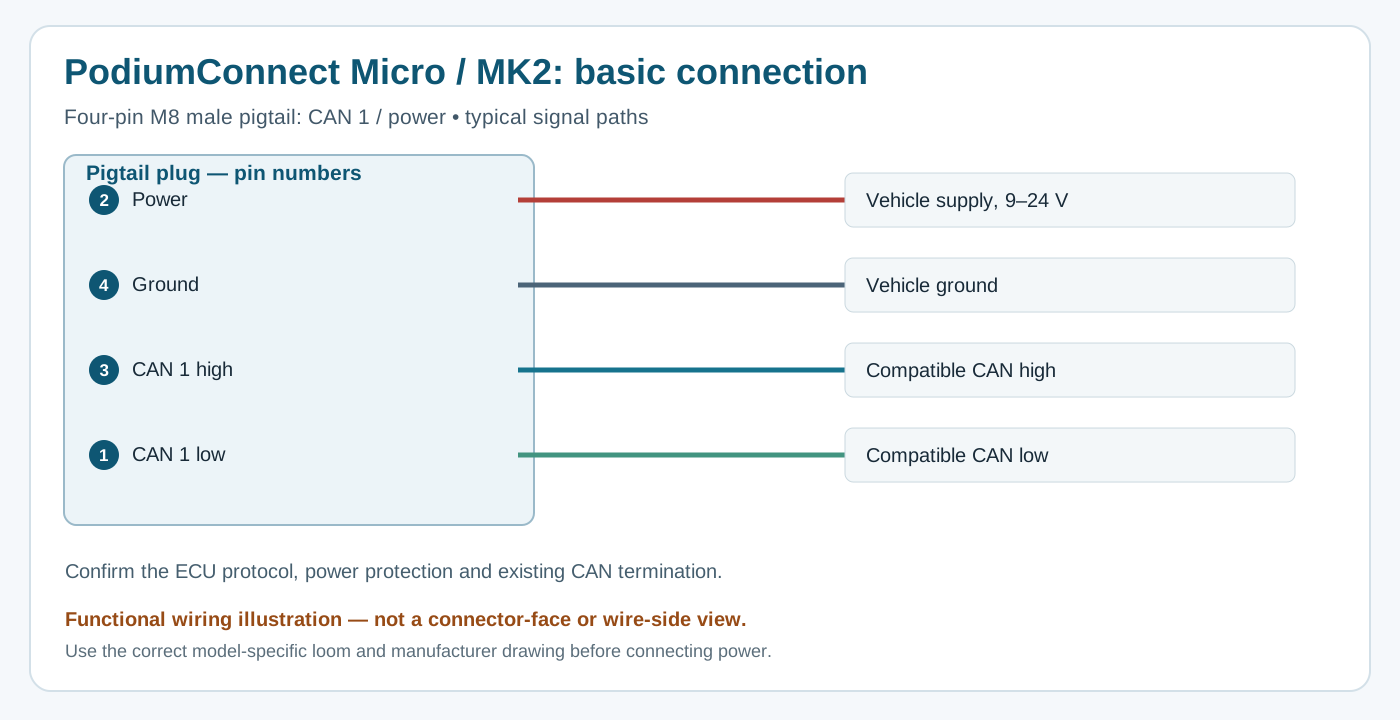
Functional schematic, not connector-face view. Original wiki diagram based on PodiumConnect Micro and MK2 guide.
These assignments are documented for the named male pigtail. Select the proper adapter and confirm the manufacturer drawing, cavity markings, cable colours and device generation before wiring. Match CAN bitrate, decoding and network termination.
The manufacturer lists an AiM Data Hub adapter and other model-specific leads. Wi-Fi access point mode alone is not a remote internet link; verify hotspot, account and service requirements. Micro installation.
See the Autosport Labs manufacturer guide.
Rendered revisions
Open each version to inspect formatting, tables and photographs.
Revision 1: Autosport Labs PodiumConnect Micro
PodiumConnect/Micro connects a compatible CAN data system to local logging and the Podium service through a separately supplied Wi-Fi hotspot.
PodiumConnect/Micro is designed to connect an existing data system to Podium. The manufacturer documents one CAN 2.0 bus, software-controlled termination, local recording, and streaming through a supplied-by-user Wi-Fi hotspot; it is not the same as an integrated cellular modem. Its guide provides data-system integration instructions including AiM, MoTeC and VBOX. Check the precise source device, available broadcast channels, cable, GPS data and configuration. Its stated maximum telemetry sample rate is 10 Hz, while local logging can use different rates.
The manufacturer lists one CAN 2.0 interface, software-controlled termination, local SD logging and hotspot-based telemetry up to 10 Hz; a separate source supplies channels such as GPS. The local recording rate and transmitted update rate differ. Micro technical guide.
Pigtail pinout and wiring
Functional schematic, not connector-face view. Original wiki diagram based on PodiumConnect Micro and MK2 guide.
M8 four-pin pigtail
Signal
1
CAN low
2
Power, 9–24 V
3
CAN high
4
Ground
These assignments are documented for the named male pigtail. Select the proper adapter and confirm the manufacturer drawing, cavity markings, cable colours and device generation before wiring. Match CAN bitrate, decoding and network termination.
The manufacturer lists an AiM Data Hub adapter and other model-specific leads. Wi-Fi access point mode alone is not a remote internet link; verify hotspot, account and service requirements. Micro installation.
PodiumConnect/Micro is designed to connect an existing data system to Podium. The manufacturer documents one CAN 2.0 bus, software-controlled termination, local recording, and streaming through a supplied-by-user Wi-Fi hotspot; it is not the same as an integrated cellular modem. Its guide provides data-system integration instructions including AiM, MoTeC and VBOX. Check the precise source device, available broadcast channels, cable, GPS data and configuration. Its stated maximum telemetry sample rate is 10 Hz, while local logging can use different rates.
The manufacturer lists one CAN 2.0 interface, software-controlled termination, local SD logging and hotspot-based telemetry up to 10 Hz; a separate source supplies channels such as GPS. The local recording rate and transmitted update rate differ. Micro technical guide.
Data analysis software
Podium lap comparison showing speed traces and time gaps in an earlier interface. Image: Autosport Labs, reproduced with permission; manufacturer image source.
The RaceCapture app configures Micro and can analyse locally recorded data; its manufacturer also describes reviewing uploaded sessions on Podium. The Micro receives channels from an external data system and needs a separate hotspot for live internet telemetry. See the manufacturer model guide and RaceCapture app guide for setup and analysis. Download the RaceCapture app from Autosport Labs; Podium is the separate online telemetry and session-analysis service. For system requirements and software details see the Autosport Labs manufacturer page.
Pigtail pinout and wiring
Functional schematic, not connector-face view. Original wiki diagram based on PodiumConnect Micro and MK2 guide.
M8 four-pin pigtail
Signal
1
CAN low
2
Power, 9–24 V
3
CAN high
4
Ground
These assignments are documented for the named male pigtail. Select the proper adapter and confirm the manufacturer drawing, cavity markings, cable colours and device generation before wiring. Match CAN bitrate, decoding and network termination.
The manufacturer lists an AiM Data Hub adapter and other model-specific leads. Wi-Fi access point mode alone is not a remote internet link; verify hotspot, account and service requirements. Micro installation.