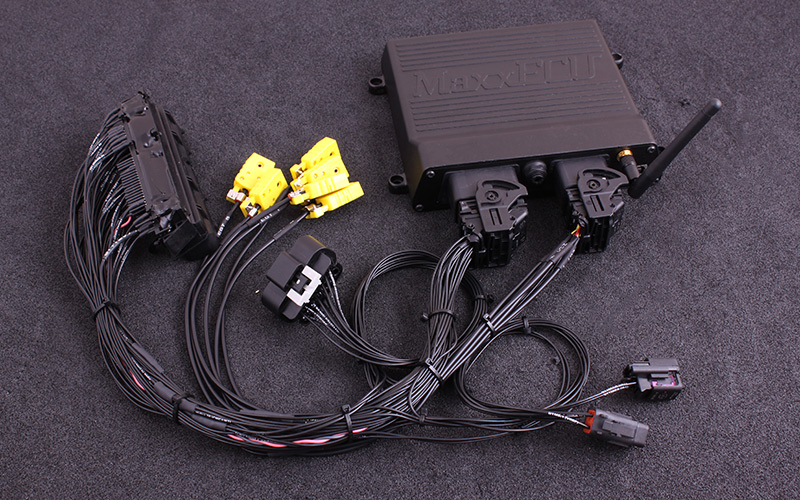
MaxxECU Audi S4/RS4 2.7 biturbo (ME 7.1) plug-in adapter connects a compatible MaxxECU to an application-specific factory wiring loom. It is an adapter and installation package rather than a new universal ECU architecture. The published MaxxECU application guide identifies its intended configuration and connector details.
Identification and scope
Match the vehicle, engine, original ECU and connector, transmission, adapter revision and the MaxxECU unit to the guide. GEN1 adapters and earlier V1-specific adapters are not automatically interchangeable. The manufacturer's GEN1 adapter index separates the vehicle-specific instructions.
Manufacturer-listed examples
These examples and qualifications are transcribed from the manufacturer's adapter guide. A listed platform is not proof that every market or hardware combination is compatible; check the exact ECU, loom and transmission.
| Vehicle | Engine code | Year | LSU sensor | Note |
|---|---|---|---|---|
| Audi S4 B5 2.7 biturbo | AGB, AZB | 1998 - 2002 | External sensor needed | Only uses one WBO sensor |
| Audi RS4 2.7 biturbo | AZR | 2001 | External sensor needed | Only uses one WBO sensor |
| Golf R32 | BDE | 1997 - 2003 | Uses stock LSU 4.2 sensor | Not available yet!! |
Vehicle and ECU functions
Manufacturer's mapping and availability for this particular adapter; a yes or no applies only to the configuration named in the table. Confirm adapter revision, hardware and calibration with the original guide.
| Options | OEM ECU PIN | MaxxECU IO | RACE | Note |
|---|---|---|---|---|
| VVT solenoid | 115 | GPO 1 | Yes | |
| Check engine light | 48 | GPO 2 + Audi ME 7.5 CAN | Yes | |
| Boost solenoid (OEM) | 104 | GPO 4 | Yes | Only on turbo engines |
| Variable intake valve | 121 | GPO 4 | Yes | Only on Golf R32. Can be used to control the variable intake, or for boosted applications the boost solenoid (requires a solenoid to be wired to the valve solenoid connector) |
| Fuel pump relay | 65 | GPO 5 | Yes | |
| VVT exhaust solenoid | 120 | GPO 6 | Yes | Parallel connected to extra 16-pin connector also if not used. |
| Tachometer | 37 | GPO 8 + Audi ME 7.5 CAN | Yes | |
| E-Throttle | 117/118 | GPO 11/12 | Yes | |
| Sequential injection | INJ 1 - 6 | Yes | ||
| IAC cutoff valve | 9 | INJ 7 | Yes | |
| EVAP | 64 | INJ 8 | Yes | |
| Sequential ignition | IGN 1 - 6 | Yes | ||
| Knock sensors (OEM) | 106, 107 | KNOCK1, KNOCK2 | Yes | |
| Secondary air pump | 44,46 | - | No | |
| Intake air temperature sensor | IAT | Yes | Paralell connected with 2-pin extra connector | |
| Coolant temperature sensor | CLT | Yes | ||
| Clutch switch | 39 | AIN 1 | YES | |
| Brake pedal | 56 | AIN 2 | YES | |
| Vehicle speed (VSS) | 54 | DIN 1 | Yes | Also from CAN, Audi ME 7.5 CAN |
| EPC light | - | Audi ME 7.5 CAN | CAN only! | |
| Instrument cluster/ABS | - | Audi ME 7.5 CAN | CAN only! | |
| Fuel consumption | No | |||
| Cruise control | No | |||
| Bluetooth ( MDash) | Yes | |||
| EGT option | Yes, direct | 6 EGT direct in harness | ||
| OEM EGT-sensors | No |
Additional connector
The following is the extra connector table in the model-specific guide. Refer to its illustrated connector and installation notes for view, cable colours, electrical limits and revision; these positions are not the factory ECU connector.
| Pin | Description | Usage | Note |
|---|---|---|---|
| 1 (H) | +5V sensor supply | ||
| 2 (G) | Sensor GND | ||
| 3 (F) | TPS AIN | 0-5V analog input | |
| 4 (E) | AIN 4 | 0-5V analog input | |
| 5 (D) | DIN/VR 4 | Digital input | |
| 6 (C) | DIN/VR 5 | Digital input | |
| 7 (B) | GPO 6 | Output | Also parallel connected to VVT exhaust valve (if your vehicle has one) |
| 8 (A) | GPO 7 / DIN 3 | Output or digital input | |
| 9 (S) | |||
| 10 (R) | |||
| 11 (P) | |||
| 12 (N) | +12V | Output at ignition on | |
| 13 (M) | Engine GND | ||
| 14 (L) | GPO 3 | Output | |
| 15 (K) | DIN 2 | Digital input | |
| 16 (J) | AIN 3 | 0-5V analog input |
Installation and verification
The adapter may require an external wideband sensor, a MAP hose, additional connectors, or other changes depending on the application and kit. Do not assume that every factory function, emissions device, dashboard feature, air-conditioning function or transmission is supported. Check the model-specific tables, base configuration and full manufacturer installation guide for the exact unit before connection and calibration.
Documents
- MaxxECU Audi S4/RS4 2.7 biturbo (ME 7.1) adapter installation and pinout
- GEN1 plug-in compatibility and wiring index
- MaxxECU manufacturer and universal-model index
Sources reviewed 17 November 2026.