BMW DIS (Diagnostic Information System) was the workshop diagnosis software used with equipment such as DISplus and the GT1. The software, tester and vehicle interface are separate parts of the setup: GT1 is the portable tester, DISplus is a workshop tester, and a diagnostic head or another supported interface connects the tester to the vehicle. BMW documentation uses “DIS” for the diagnosis system and, in some contexts, for its computer equipment, so identify the actual hardware and software version when describing a setup.
What DIS was designed to do
DIS was a workshop diagnosis environment rather than only a fault-code reader. BMW training material describes fault-driven and customer-symptom-driven test plans, control-unit functions for manual investigation, service functions, an integrated measuring-system workflow, and vehicle electrical troubleshooting information. The functions and available data depended on the installed DIS CD, model series, control units fitted and compatible interface.
A typical session connected the diagnostic head, selected the vehicle series, identified the vehicle and ran a short test. The tester then listed detected control units and stored faults. The technician could follow the proposed DIS test schedule, select a fault pattern related to the customer complaint, or use function and component selection to investigate a system directly. BMW's diagnosis procedure also calls for reviewing stored faults, completing the applicable test modules and checking current technical information; if the fault is not isolated, a technician can create an own test schedule.
Guided tests and manual functions
In guided diagnosis, the test schedule linked findings to test modules and supporting information. A module could give step-by-step checks or request measurements. BMW's training describes assessment of fault-memory entries using context such as frequency and temperature, so a stored entry should be read alongside the test result and complaint rather than treated by itself as a parts diagnosis.
Expert Mode provided direct access to function and component selection, documents, an own test plan, control-unit functions and the measurement system. Depending on the control unit and vehicle data, control-unit functions included identification, reading or clearing fault memory, component activation and diagnostic requests for live values. These functions were offered for modules identified by the short test. Available menu paths changed across vehicle diagnostic concepts and software releases.
DIS also included vehicle electrical troubleshooting information (ETM). Diagrams could be opened from a test plan or browsed by system and component. Linked document hotspots could lead to related diagrams, connector and pin-assignment views, component locations, fuse details and functional descriptions. This made DIS useful for moving between an electronic test result and the vehicle's wiring information; the exact documents depended on the selected vehicle and installed data.
The measuring system could be called from a test plan and used with the compatible measurement equipment in the workshop setup. BMW training examples combine DIS readings and component activation with electrical measurements such as resistance, voltage and oscilloscope traces. Measurement tools, leads and safe test conditions remain separate requirements; DIS does not make an unsuitable probe or connection safe.
Vehicle identification and coverage
BMW's 2006 diagnosis training explains that automatic identification on the covered vehicles used control-unit data such as ZCS or vehicle order to determine the fitted systems. When the tester could not communicate or automatic identification failed, manual identification was available. A short test then checked the modules that could be reached. A communication fault, incorrectly selected series, missing vehicle data or an incompatible head can therefore affect the result; an empty or incomplete module list does not establish that the vehicle has no faults.
Coverage is release-specific. BMW's equipment guide describes each DIS CD as containing diagnostic programs such as test modules, wiring diagrams and system status values, and notes that new releases could add or update diagnostic routines. A version label alone does not prove that the correct vehicle data or interface is present. Check the exact model, production period, control-unit configuration, DIS data release and diagnostic head before relying on a procedure.
The required interface also depends on the vehicle's communication systems and the job. BMW's period equipment documentation lists diagnostic heads as well as OPS and OPPS optical interfaces for particular vehicle and network configurations. These are not interchangeable with the GT1 display itself, and a generic cable that connects physically is not proof that every module or procedure is supported.
Coding and programming changed over time
Older DIS releases included coding and programming data for some earlier production series. BMW's ST406 training describes the move with CIP 15.0 and Progman: DISplus and GT1 remained diagnosis tools and could initiate a coding or programming request, while the Software Service Station (SSS) performed the operation. Treat this as a period-specific workflow, not a description of every DIS installation. See BMW SSS and Progman for that equipment.
Operating environment and later installations
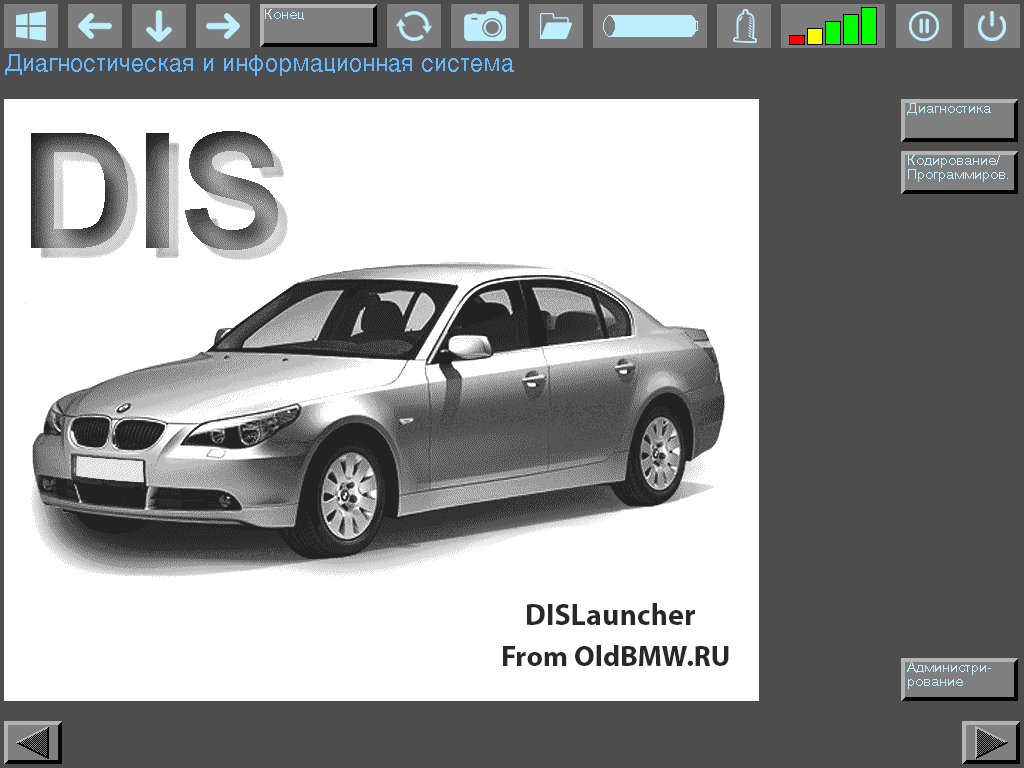
Historical DIS installations used SCO Unix. Enthusiasts may encounter virtualised installations or other independently assembled configurations, but the host computer, virtual machine, DIS data, network settings and vehicle interface are separate compatibility questions. Replicating the software screen does not by itself replicate the coverage or communication behaviour of a workshop GT1 or DISplus. The pictured DISLauncher is a third-party overlay for a virtualised setup, not a standard BMW DIS screen or factory application.
BMW workshop terminology can be confusing: DIS may refer to the Diagnostic Information System software, while DISplus and GT1 name tester equipment used with it. The earlier stationary DIS tester, DISplus, GT1 and separate diagnostic heads should not be treated as one interchangeable device. Later BMW workshop systems are covered in the ISTA article.
Sources
These references describe historical BMW equipment and software. They do not establish compatibility for an untested third-party setup.
- BMW Diagnosis, BMW Group technical training module, initial print date February 2006, especially pp. 3–20 and 26–27. Rehosted copy; describes the DISplus/GT1 diagnostic workflow, functions, service procedures, measurement system and electrical diagrams. Accessed 2026-11-10.
- BMW Group ST406, Coding & Programming, especially pp. 4–10 and 23–24. BMW technical training manual covering DIS CD data, GT1/DISplus/SSS equipment, interfaces, network and the Progman transition. Accessed 2026-11-10.
- BMW AG TIS, Specified Process for Diagnosis BMW/MINI, issue status 12/2007. Rehosted workshop information; sets out the sequence of short test, complaint symptom selection, DIS test schedule and review of technical information. Accessed 2026-11-10.
- BMW Group ST608, xDrive Dynamics, especially p. 24. BMW training exercise showing DISplus/GT1 control-unit requests, component activation and combined electrical measurements. Accessed 2026-11-10.
- BMW diagnostic tools overview for the E46, independent reference noting the historical SCO Unix environment. Accessed 2026-11-10.
- Installing DIS on VMware, GT1 and IBM T30, OldBMW.ru; independent descriptions of separate virtualised, GT1-tablet and laptop configurations.
- DISLauncher, OldBMW.ru; developer's description of the third-party virtual-machine overlay.