MAP3D CLOUD is Flashtec’s installed ECU calibration editor. It combines numerical tables and graphical views with a raw hexadecimal view, automatic map search, definition tools and optional cloud-oriented file management. Despite the name, the product is described as desktop software, not simply a page in a browser.
Editing and definitions
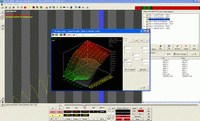
The product description lists 2D, 3D, hexadecimal and table modes, together with original-versus-modified comparison and numerical operations on selected values. It also lists automatic map search, a map database, a Driver editor and ASAP/DAMOS import. A definition supplies interpretation such as location, dimensions or breakpoints; check it against the actual file before editing.
Flashtec describes a multi-document workspace and reference-file functions for comparing and applying changes. These can save time when working with related files, but differences between software versions make it important to inspect the resulting values and addresses rather than assuming that a transfer is correct.
Cloud, checksums and compatibility
The advertised cloud features include synchronisation and backup across installations, plus a private-server/workgroup option. Availability and configuration should be checked for the installed release and service arrangement. Flashtec also lists a Check’nGo checksum plug-in and manual checksum functions; supported algorithms and the exact workflow must be verified for the ECU in use.
The public product page names older Windows versions. That is useful historical context, not evidence that every current Windows release is supported. Confirm the current installer, licensing, cloud service and operating-system requirements before relying on them.