ICOM stands for Integrated Communication Optical Module. It is the vehicle communication interface in the later BMW workshop system: the application runs on the diagnostic computer, while ICOM connects the computer or network to the vehicle. An ICOM is not ISTA itself.
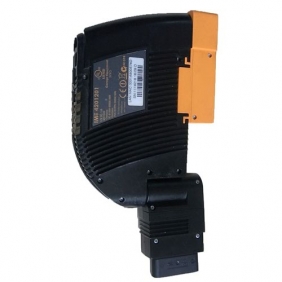
Family and generations
The original ICOM A and ICOM A2 are legacy units; ICOM Next A is the later main interface. BMW's Next guide explicitly lists legacy A/A2 and describes compatibility between the two families' adapters. Exact support still depends on the installed workshop software and firmware.
What the letters mean
- A: main interface for vehicle OBD communication and connection to the tester/network.
- B: USB-connected companion adapter for a supported MOST optical connection.
- C: adapter for the older round 20-pin vehicle diagnostic socket.
- D: motorcycle adapter in the Next family.
These are different functions, not successive versions of the A interface. A B or C adapter by itself does not replace an A. The appropriate communication route depends on the vehicle, operation and BMW instructions.
Identifying a unit
Record the label, serial/part number, cable and firmware instead of identifying a device only by its coloured case. Reproductions are widely advertised, so appearance and seller terminology are not proof of origin. BMW's illustrated ICOM Next guide shows the family and its adapters.
Network and WLAN
ICOM Next A can use WLAN as an alternative to its wired network connection, but the wireless interface must be configured. The exact hardware and menus depend on the ICOM generation and firmware. See the ICOM Next Wi-Fi setup guide for the documented ISTA workflow, and check the unit-specific manual before applying it to a legacy or third-party interface.
Sources
Curated reference notes. Applicability follows the cited sources; hardware testing by this wiki is not implied.
- BMW ICOM Next hardware family user guide. BMW-hosted ACTIA I+ME hardware family user guide; components, connections, WLAN operation and legacy adapter compatibility. Source revision Guide version 1.00, 2015, especially printed pages 8–9, 11–13 and 26; accessed 2026-11-10.
- BMW Group Techinfo website and AOS user guide. BMW of North America; AOS, ISTA, ICOM, pass-through, connectors and programming preparation; regional requirements may vary. Source revision BMW Techinfo system requirements and user guide, 2022; accessed 2026-11-10.
- BMW ISTA/P vehicle programming user documentation. BMW AG documentation hosted by Motodok; illustrated early ISTA/P, ICOM, ISIS and ISSS architecture. Source revision Version V2.31.0, August 2008, especially pages 7–12 and 83–84; accessed 2026-11-10.
- BMW Group ISPI Administrator Manual, Release 1503. BMW AG manual, mirrored by Scribd; ICOM configuration and WLAN workflow, especially pp. 76–78; accessed 2026-11-10.