WinOLS is EVC electronic’s Windows software for analysing and editing the memory contents of engine and other control units. It combines a raw data view with tools for locating calibration tables, defining maps and working on several versions of a file. It is aimed at users who want to inspect both identified maps and the surrounding binary data.
Maps and data views
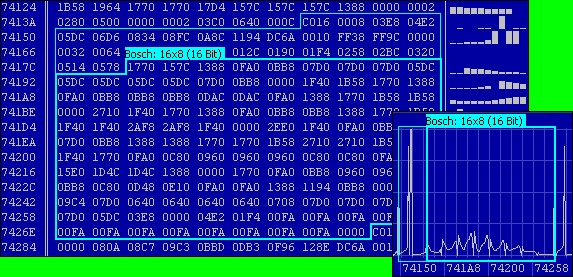
WinOLS can search for possible maps and show the results in a project map list and in the underlying data. A map may be viewed as a table, a 2D graph or a 3D surface; the hex/decimal view remains useful for examining bytes and adjacent areas. Search results are candidates, so their address, dimensions, byte order, axes and scaling still need to be checked against the specific ECU software.
Map packs and imported definitions can supply names and structure. EVC documents several ways to reuse map information and compare changes between related projects, but a similar-looking file is not proof that its maps have identical addresses or meanings.
Projects, checksums and equipment
WinOLS organises work in projects with an original file and named or commented versions. This is useful when comparing an edit with its starting point or returning to an earlier stage. EVC lists plug-ins for checksum correction and for additional import functions; support depends on the ECU, plug-in and licence. EVC also lists supported programming hardware, but file editing by itself does not establish a read/write procedure for a particular ECU.
Before choosing it
- Check the base licence, premium features and plug-ins needed for the exact task.
- Check definition availability and compatibility with the ECU’s hardware and software numbers.
- Confirm whether the editor, a plug-in or the programming tool will handle all checksums.