Removed text is struck through; added text is highlighted.
BMW diagnostics index
ICOM A is the original main vehicle interface of the ICOM family. BMW's period documentation calls it ICOM A. The name ICOM A1 appears in aftermarket listings, including Chinese replica listings, but is not a separate factory generation. The later ICOM Next A succeeded the earlier ICOM A family; BMW also documents a legacy ICOM A2.
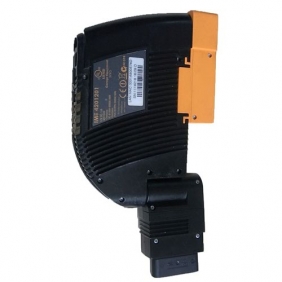
ICOM A-style diagnostic interface offered for BMW vehicles; the pictured unit's manufacturer and authenticity have not been verified. Photo: BMW ICOM BMW ISIS ISID A+B+C by obdchina.com, CC BY-ND 2.0; original image, unchanged.
Connections and companions
The original A interfaces with the vehicle's diagnostic socket and the workshop network. BMW's 2008 ISTA/P documentation illustrates a network connection, USB port and OBD connector. ICOM B is the external MOST adapter: it connects to ICOM A by USB and to the vehicle's MOST access point. ICOM C adapts ICOM A to the round 20-pin diagnostic socket on supported older vehicles. Neither B nor C is a separate main interface. See BMW's workshop system guide.
In the early architecture, the application, workshop server and display were separate from the ICOM. See ISIS, ISID and ISSS and the ICOM family overview.
Practical identification
Check its label, genuine part number, cabling and software support before buying or using a second-hand device. A particular shell does not establish authenticity or support on a current ISTA release. For the original equipment illustration see the BMW ISTA/P manual, page 8.
Sources
Curated reference notes. Applicability follows the cited sources; hardware testing by this wiki is not implied.
BMW ISTA/P vehicle programming user documentation. BMW AG documentation hosted by Motodok; illustrated early ISTA/P, ICOM, ISIS and ISSS architecture. Source revision Version V2.31.0, August 2008, especially pages 7–12 and 83–84; accessed 2026-11-10.BMW ICOM Next hardware family user guide. ACTIA I+ME hardware family user guide, independent mirror; components, connections and legacy adapter compatibility. Source revision Guide version 1.00, 2015, especially printed pages 8–9 and 26; accessed 2026-11-10.BMW ISTA user manual: workshop system components. BMW Group manual hosted by Carmod; descriptions of ISIS, ISID, IMIB and ICOM. Source revision ISTA user's manual, introduction section 1.4; accessed 2026-11-10.
Rendered revisions
Open each version to inspect formatting, tables and photographs.
ICOM A is the original main vehicle interface of the ICOM family. BMW's period documentation calls it ICOM A. The name ICOM A1 appears in aftermarket listings, including Chinese replica listings, but is not a separate factory generation. The later ICOM Next A succeeded the earlier ICOM A family; BMW also documents a legacy ICOM A2.
ICOM A-style diagnostic interface offered for BMW vehicles; the pictured unit's manufacturer and authenticity have not been verified. Photo: BMW ICOM BMW ISIS ISID A+B+C by obdchina.com, CC BY-ND 2.0; original image, unchanged.
Connections and companions
The original A interfaces with the vehicle's diagnostic socket and the workshop network. BMW's 2008 ISTA/P documentation illustrates a network connection, USB port and OBD connector. ICOM B is the external MOST adapter: it connects to ICOM A by USB and to the vehicle's MOST access point. ICOM C adapts ICOM A to the round 20-pin diagnostic socket on supported older vehicles. Neither B nor C is a separate main interface. See BMW's workshop system guide.
Check its label, genuine part number, cabling and software support before buying or using a second-hand device. A particular shell does not establish authenticity or support on a current ISTA release. For the original equipment illustration see the BMW ISTA/P manual, page 8.
Sources
Curated reference notes. Applicability follows the cited sources; hardware testing by this wiki is not implied.
ICOM A is the original main vehicle interface of the ICOM family. BMW's period documentation calls it ICOM A. The name ICOM A1 appears in aftermarket listings, including Chinese replica listings, but is not a separate factory generation. The later ICOM Next A succeeded the earlier ICOM A family; BMW also documents a legacy ICOM A2.
ICOM A-style diagnostic interface offered for BMW vehicles; the pictured unit's manufacturer and authenticity have not been verified. Photo: BMW ICOM BMW ISIS ISID A+B+C by obdchina.com, CC BY-ND 2.0; original image, unchanged.
Connections and companions
The original A interfaces with the vehicle's diagnostic socket and the workshop network. BMW's 2008 ISTA/P documentation illustrates a network connection, USB port and OBD connector. ICOM B is the external MOST adapter: it connects to ICOM A by USB and to the vehicle's MOST access point. ICOM C adapts ICOM A to the round 20-pin diagnostic socket on supported older vehicles. Neither B nor C is a separate main interface. See BMW's workshop system guide.
Check its label, genuine part number, cabling and software support before buying or using a second-hand device. A particular shell does not establish authenticity or support on a current ISTA release. For the original equipment illustration see the BMW ISTA/P manual, page 8.
Sources
Curated reference notes. Applicability follows the cited sources; hardware testing by this wiki is not implied.